

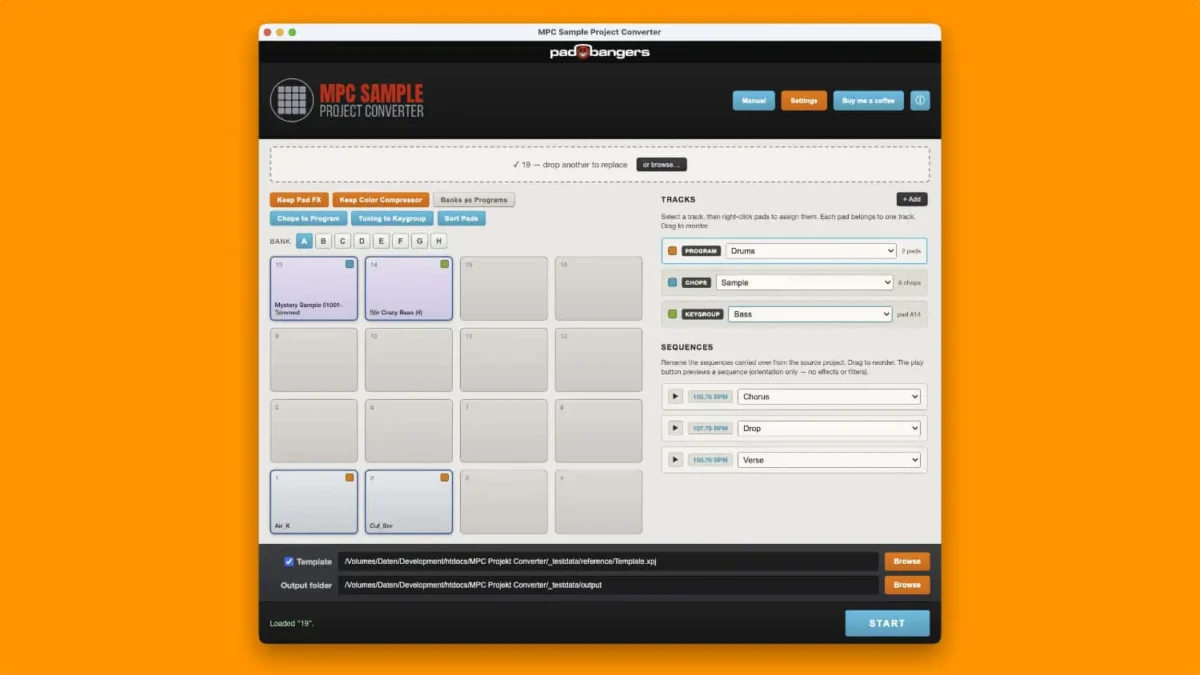
In an era where music production is increasingly decentralized, moving between mobile applications and high-end hardware remains a significant technical hurdle for many producers. Padbangers, a developer known for its specialized tools and sample resources for the beat-making community, has officially addressed a long-standing workflow inefficiency with the release of the MPC Sample Project Converter. This new application, offered as a free download, is designed to bridge the gap between the portable "MPC Sample" project format and the robust standalone environments of Akai Professional’s flagship hardware, including the MPC One, MPC Live, and the MPC X and XL series.
For years, the MPC ecosystem has expanded to include various entry points, from mobile-centric apps to desktop software and standalone workstations. However, the transition of creative ideas from a mobile or simplified environment into the professional standalone hardware has often been fraught with organizational challenges. The MPC Sample Project Converter aims to automate the tedious process of re-organizing tracks, programs, and sample assignments, allowing producers to maintain their creative momentum when transitioning from a sketch to a full studio production.
Addressing the Limitations of Mobile-to-Hardware Integration
The primary catalyst for the development of this utility is a specific limitation found within the native import functions of modern MPC hardware. When a user attempts to import an "MPC Sample" project—often created in more restricted or mobile-oriented environments—into a standalone unit like the MPC Live II or MPC One, the hardware typically aggregates all project data into a single track. This results in a "flattened" project where individual elements, such as drums, basslines, and melodic chops, are difficult to isolate, edit, or mix independently.
The MPC Sample Project Converter solves this by intelligently parsing the project data and splitting it into clean, distinct tracks. By automating the separation of these elements, the tool ensures that the project structure on the hardware mirrors the intended arrangement of the producer. This organizational clarity is essential for professional mixing, as it allows users to apply specific insert effects, EQ, and compression to individual tracks rather than being forced to process the entire project as a single stereo or mono stream.
Technical Transformations: Chops and Keygroups
Beyond simple track organization, the MPC Sample Project Converter introduces sophisticated handling for sample manipulation and melodic performance data. One of the most significant features of the application is its ability to convert "chops" and "16 Levels" tuning melodies into functional, playable programs.
In the traditional MPC workflow, "chopping" involves taking a single audio sample and slicing it into smaller segments assigned to different pads. The converter takes these chops and automatically generates a "Chop Program," ensuring that all slices are correctly mapped and ready for immediate performance upon loading the project into the hardware.
Furthermore, the tool addresses the "16 Levels" function, a staple of the MPC workflow that allows a single sample to be played across the pads at different pitches or velocities. Previously, when moving these projects to the larger MPC format, the melodic information could be lost or difficult to manipulate as a standard instrument. The MPC Sample Project Converter transforms these tuning-based melodies into "Keygroups." By converting samples into Keygroup programs, the software allows the MPC hardware to treat the sample as a multi-sampled instrument, providing better pitch shifting, envelope control, and playability across a MIDI keyboard or the integrated pad grid.
Features and Workflow Enhancements
The application is not merely a file converter but a utility designed to fit into a modern studio’s pre-production phase. Key features included in the initial release include:
- In-App Preview: Users can audition their projects within the converter interface before finalizing the conversion. This ensures that all samples are accounted for and that the track separation logic has been applied correctly.
- MPC 2 Software Support: While the primary focus is on standalone hardware users, the tool has been updated to support conversion to the MPC 2 desktop software format. This provides a seamless path for users who prefer to start on mobile and move to a DAW-based environment for final arrangement and mastering.
- Optional Mixer Templates: To further speed up the transition, the application offers optional templates for mixer setups. This allows producers to apply their preferred routing and bus configurations automatically during the conversion process, reducing the time spent on repetitive setup tasks.
- Multi-Platform Compatibility: Recognizing the diverse nature of the music production community, Padbangers has released the tool for Linux, macOS, and Windows. The inclusion of Linux support is particularly noteworthy, as the music technology industry often overlooks this segment of the user base.
Chronology of the MPC Ecosystem and the Need for Third-Party Utilities
To understand the impact of the MPC Sample Project Converter, one must look at the evolution of the Akai MPC line. Since the late 1980s, the MPC (Music Production Center) has been the cornerstone of hip-hop, house, and electronic music production. The transition from the classic MIDI production centers like the MPC 60 and MPC 2000XL to the modern "Touch" and "Live" era marked a shift toward a software-driven architecture housed within standalone hardware.

With the release of the MPC 2.0 software, Akai Professional unified the experience between their hardware and the computer. However, as the ecosystem grew to include mobile apps and simplified "Sample" versions of the software, the file formats became increasingly fragmented. While Akai has provided some level of backward compatibility and cross-format support, gaps have remained—particularly regarding how metadata and track assignments are handled during the import process.
Padbangers’ decision to release this tool as a free utility follows a long tradition in the music technology world where third-party developers create "glue" applications to fix specific workflow friction points. Similar to how early MPC users relied on third-party programs to manage proprietary disk formats, modern producers now look to developers like Padbangers to streamline the digital handoff between devices.
Industry Implications and User Reactions
The release of the MPC Sample Project Converter has been met with positive early feedback from the beat-making community. On various production forums and social media platforms, users have noted that the "single track" import issue has been a persistent annoyance for those who use the MPC as their primary brain for both live performance and studio recording.
Industry analysts suggest that the availability of such tools actually strengthens the Akai ecosystem. By lowering the barrier to entry and making the transition from mobile sketching to professional production easier, tools like this encourage users to invest more heavily in the hardware. While Akai Professional has not officially commented on the third-party release, the community’s reliance on such utilities often highlights areas where manufacturers can improve their native firmware in future updates.
From a technical standpoint, the converter’s ability to handle Keygroups is seen as its most valuable asset. Keygroups are notoriously complex to set up manually, requiring the user to define pitch ranges, root notes, and filter mappings for each sample zone. By automating this, Padbangers is effectively giving producers back hours of administrative time, which can instead be spent on the creative aspects of composition.
Broad Impact on Standalone Music Production
The broader implication of this release is the continued validation of the "standalone" workflow. In recent years, there has been a significant "DAW-less" movement, where musicians seek to move away from the distractions of a computer screen. The MPC One, Live, and X are central to this movement. However, the irony of the DAW-less workflow is that it often requires significant computer-based preparation to ensure that files and projects are organized for the hardware.
The MPC Sample Project Converter acknowledges this reality. It provides a bridge that utilizes the power of a computer to organize data so that the eventual hardware experience is as fluid and creative as possible. By simplifying the conversion of mobile projects, Padbangers is supporting a multi-device lifestyle where a producer might start a beat on a phone or tablet during a commute and finish it on an MPC X in a professional studio without losing any of the nuanced "16 Levels" programming or sample chopping they performed earlier in the day.
Conclusion and Availability
The MPC Sample Project Converter represents a significant win for the MPC user base. By providing a solution to a specific, high-friction problem, Padbangers has solidified its reputation as a developer that understands the practical needs of modern producers. The fact that the tool is provided for free, across all major operating systems, ensures that it will likely become a standard part of the toolkit for any MPC owner who works across different formats.
As music production hardware continues to become more powerful and software-dependent, the need for clean data translation between environments will only grow. For now, the MPC Sample Project Converter stands as a vital utility for those looking to maximize the potential of their standalone hardware, ensuring that the transition from a simple sample project to a professional production is as seamless as possible.
The MPC Sample Project Converter is available for immediate download through the official Padbangers website. It supports Windows, macOS, and Linux, providing a universal solution for the global community of MPC users. As the developer continues to refine the tool, it is expected to remain a staple for producers looking to maintain a clean, professional, and efficient workflow within the Akai Professional ecosystem.
