

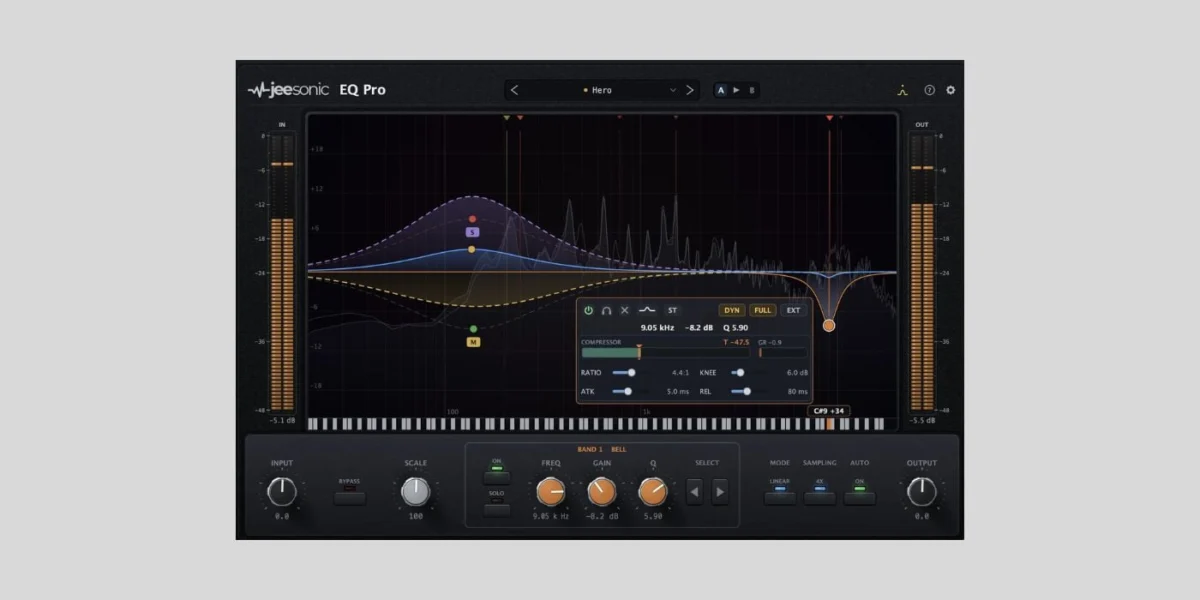
Jeesonic, a prominent developer in audio software, has announced the release of version 1.2.2 for its acclaimed EQ Pro plugin, a free 24-band dynamic equalizer compatible with macOS and Windows operating systems. This latest update represents a substantial enhancement to an already highly regarded tool, solidifying its position as one of the most sophisticated and feature-rich free equalizer plugins currently available to audio professionals and enthusiasts alike. The update introduces a suite of advanced functionalities and user interface refinements that collectively elevate EQ Pro closer to the capabilities traditionally associated with high-end, commercially licensed equalizers.
The landscape of digital audio workstations (DAWs) and their accompanying plugins has undergone a significant transformation over the past decade. Historically, essential mixing tools like equalizers often necessitated considerable financial investment to acquire professional-grade solutions. However, the emergence of developers like Jeesonic, committed to offering powerful tools at no cost, has progressively democratized access to high-quality audio processing. EQ Pro, since its initial launch, has been a testament to this shift, providing transparent, surgical equalization with an impressive array of features that were once the exclusive domain of premium products.
Understanding the Core of Jeesonic EQ Pro
At its foundation, Jeesonic EQ Pro is designed as a transparent and surgical equalizer. Its architecture supports up to 24 freely placeable bands, offering granular control over the frequency spectrum. This extensive band count allows for highly precise adjustments, enabling engineers to sculpt sounds with meticulous detail, whether for corrective purposes or creative sound design. A key feature is its interactive curve, which provides immediate visual feedback on adjustments, alongside a real-time spectrum analyzer that helps identify problem frequencies or areas requiring enhancement.
Beyond static equalization, EQ Pro incorporates per-band dynamics, a crucial capability that allows individual frequency bands to react dynamically to the incoming audio signal. This means an EQ band can be set to only attenuate or boost when the signal within that specific frequency range crosses a defined threshold, effectively functioning as a multi-band compressor or expander. This dynamic processing is invaluable for tasks such as de-essing, taming resonant frequencies, or enhancing transients without affecting the entire frequency spectrum consistently. The plugin also supports Mid/Side and Left/Right processing, offering advanced stereo manipulation capabilities, and provides selectable phase behavior, allowing users to choose between linear phase, minimum phase, and now, the newly introduced Natural Phase mode, each with its distinct sonic characteristics and applications in mixing and mastering.
A Chronology of Development and Key Milestones
Jeesonic EQ Pro first garnered significant attention upon its initial release, quickly establishing itself as a standout in the burgeoning market of free audio plugins. Its immediate impact was largely due to its professional-grade feature set and intuitive design, prompting widespread coverage from audio production blogs and communities. The initial version was praised for offering features such as dynamic EQ, Mid/Side processing, and a high-resolution spectrum analyzer—functionalities often found only in paid alternatives.
Following its promising debut, Jeesonic demonstrated a clear commitment to continuous improvement. User feedback and ongoing internal development cycles led to the significant version 1.2 update. This update marked a pivotal moment for EQ Pro, addressing several areas for refinement and introducing substantial new capabilities. The subsequent release, version 1.2.2, is a minor iteration primarily focused on addressing specific bug fixes and further polishing the user experience, building directly upon the foundational improvements of 1.2. The rapid succession of these updates underscores Jeesonic’s agile development approach and its responsiveness to the evolving needs of the audio production community. This iterative development process has allowed EQ Pro to quickly mature from a promising newcomer to a robust and highly competitive tool in a relatively short timeframe, challenging the traditional development cycles of many established software companies.
Deep Dive into Version 1.2.2 Enhancements
The update to version 1.2.2, while including minor bug fixes, primarily consolidates and refines the extensive features introduced in version 1.2. These enhancements significantly broaden EQ Pro’s utility and user-friendliness:
-
Spectrum Landmarks: This innovative feature is a cornerstone of the new update. Unlike momentary peaks displayed by a standard spectrum analyzer, Spectrum Landmarks highlight frequencies that consistently stand out over time. This functionality is invaluable for identifying problematic resonant frequencies or consistent tonal imbalances within a track that might otherwise be overlooked in a rapidly fluctuating spectrum. Users can hover or click a landmark to display its precise frequency and corresponding musical note, audition the specific frequency range, or double-click to instantly place an EQ band at that exact spot. This streamlines the corrective equalization process, making it faster and more precise.
-
Preset Browser and A/B Comparison: These are standard features in professional-grade plugins, and their inclusion in EQ Pro significantly enhances workflow. The preset browser allows users to save and recall their favorite EQ settings, facilitating quick access to common corrections or creative effects. A/B comparison enables users to audition two different EQ settings side-by-side with a single click, a critical tool for making informed mixing decisions without relying solely on auditory memory, which can be unreliable.
-
Analyzer Tilt and Decay Controls: The real-time spectrum analyzer now offers customizable tilt and decay controls. Tilt adjusts the frequency response slope of the analyzer display, allowing users to emphasize different parts of the spectrum for better visual analysis. Decay controls how quickly the analyzed spectrum fades, providing flexibility to observe either short-term transients or longer-term tonal averages, catering to various analytical needs.
-
Piano Keyboard Along the Frequency Axis: A seemingly minor yet highly impactful addition, the integration of a piano keyboard along the frequency axis provides a direct musical context to frequency adjustments. For musicians and producers who think in terms of notes and octaves, this visual aid translates technical frequency values into relatable musical pitches, making it easier to identify and target specific notes or harmonic series for equalization.
-
Hover Help and Natural Phase Mode: The addition of hover help improves the learning curve, providing instant explanations for various parameters and controls. The new Natural Phase mode offers an alternative to the traditional linear and minimum phase options. While linear phase EQs avoid phase distortion by introducing pre-ringing and latency, and minimum phase EQs introduce phase shift but no pre-ringing, Natural Phase aims to strike a balance, offering a phase response that is generally perceived as more "natural" or transparent, particularly beneficial for mastering or situations where minimal phase smearing is desired without the latency penalty of linear phase.
-
Refined Dynamic Bands and Shelf Response: The automatic dynamic bands have been refined to behave more musically, meaning their responsiveness and thresholds are tuned to interact more subtly and aesthetically with the audio, preventing unnatural pumping or artifacts. Furthermore, the response of shelf filters to Q adjustments has been smoothed, allowing for more nuanced and predictable tonal shaping at the frequency extremes. The top end is also designed to remain cleaner near the upper frequency range, minimizing harshness or digital artifacts that can sometimes occur with aggressive equalization.
-
Interface Rework and Scalability: The user interface has undergone a significant overhaul, adopting a more hardware-style layout. This design choice often appeals to users who appreciate the tactile and intuitive nature of physical studio equipment. Better meters provide more accurate and visually clear feedback on signal levels and dynamics. Individual colored response lines for every band improve visual clarity, allowing users to quickly discern the contribution of each EQ band. Crucially, the VST3 version now offers stepless scaling from 75 to 200 percent, ensuring optimal viewing and usability across various monitor sizes and resolutions, a critical feature for modern production environments.
-
Version 1.2.2 Specific Fixes: The 1.2.2 update specifically addresses a fix for value-dragging in the band panel, enhancing precision and ease of use when adjusting parameters. It also adds version numbers to download filenames, simplifying file management for users.
Broader Implications and Market Impact
The continuous development and enhancement of free, professional-grade tools like Jeesonic EQ Pro carry significant implications for the audio production industry.
-
Democratization of Production: High-quality free plugins lower the barrier to entry for aspiring producers and musicians. They no longer need substantial financial investment to access tools capable of producing commercially viable sound. This fosters greater creativity and innovation within the global music community.
-
Competition and Innovation: The rise of free plugins places competitive pressure on established paid software developers. To justify their price points, commercial plugins are increasingly compelled to innovate further, offering even more advanced features, unique algorithms, or deeper integrations. This dynamic benefits all users by driving continuous improvement across the entire plugin market.
-
Evolving Expectations: As free plugins become more sophisticated, user expectations for what constitutes a "basic" or "essential" feature in an equalizer are shifting. Features like dynamic EQ, Mid/Side processing, and advanced visual analysis are no longer considered premium add-ons but are becoming standard requirements, even for entry-level tools.
-
The "Freemium" Model Challenge: While Jeesonic EQ Pro remains entirely free, its success validates the potential for "freemium" models or donation-based systems to sustain high-quality software development. Developers can build a user base on free offerings and then potentially introduce paid expansions or related products, though Jeesonic has maintained EQ Pro as a fully free solution.
Industry observers, including those at Bedroom Producers Blog, have consistently noted this trend. The sentiment that producers "do not really need to buy a paid EQ anymore" is becoming increasingly validated with updates like Jeesonic EQ Pro 1.2.2. When placed alongside other formidable free equalizers such as TDR Nova (known for its transparent dynamic EQ capabilities) and ZL Equalizer 2 (praised for its clean interface and surgical precision), Jeesonic EQ Pro contributes to a robust ecosystem of complimentary tools that collectively cover the vast majority of equalization needs for a wide range of audio production tasks.
While Jeesonic has not issued a formal press statement specifically for the 1.2.2 update, the consistent and feature-rich development trajectory strongly suggests a commitment to user experience and accessibility. One could infer that the company’s philosophy aligns with empowering producers by providing cutting-edge technology without the financial burden. The attention to detail in the interface rework, the introduction of musically intuitive features like the piano keyboard, and the refinement of core DSP functionalities like dynamic bands and phase modes, all point towards a developer deeply engaged with the practical realities and creative aspirations of its user base.
Jeesonic EQ Pro version 1.2.2 is available for immediate download from the official Jeesonic website. It supports macOS in VST3 and AU formats, and Windows in VST3 format. The update reinforces the notion that superior audio tools are increasingly accessible to everyone, fostering a more inclusive and innovative environment for music production worldwide. As the digital audio landscape continues to evolve, the impact of projects like Jeesonic EQ Pro will undoubtedly resonate, shaping the future expectations for what free software can achieve.
