
The release of Audacity 4 represents the most significant architectural and aesthetic overhaul in the two-decade history of the world’s most popular open-source audio editing software. This major version update moves beyond incremental improvements, introducing a ground-up rebuild of the application’s core infrastructure and user interface. By transitioning to a modernized framework, the development team has addressed long-standing requests for non-destructive editing, flexible workspaces, and expanded professional plug-in compatibility. While the software remains free and open-source under the GNU General Public License (GPL) v3, Audacity 4 effectively bridges the gap between a basic waveform editor and a contemporary digital audio workstation (DAW), providing creators on macOS, Windows, and Linux with a more sophisticated environment for podcasting, music production, and sound design.
A New Era for the Open-Source Audio Standard
For over twenty years, Audacity has been a staple for millions of users, ranging from students and amateur podcasters to professional audio engineers requiring a lightweight tool for quick edits. However, the software’s interface had long been criticized for its "legacy" appearance, which frequently mirrored the design conventions of the late 1990s. Audacity 4 systematically dismantles these aesthetic and functional barriers.
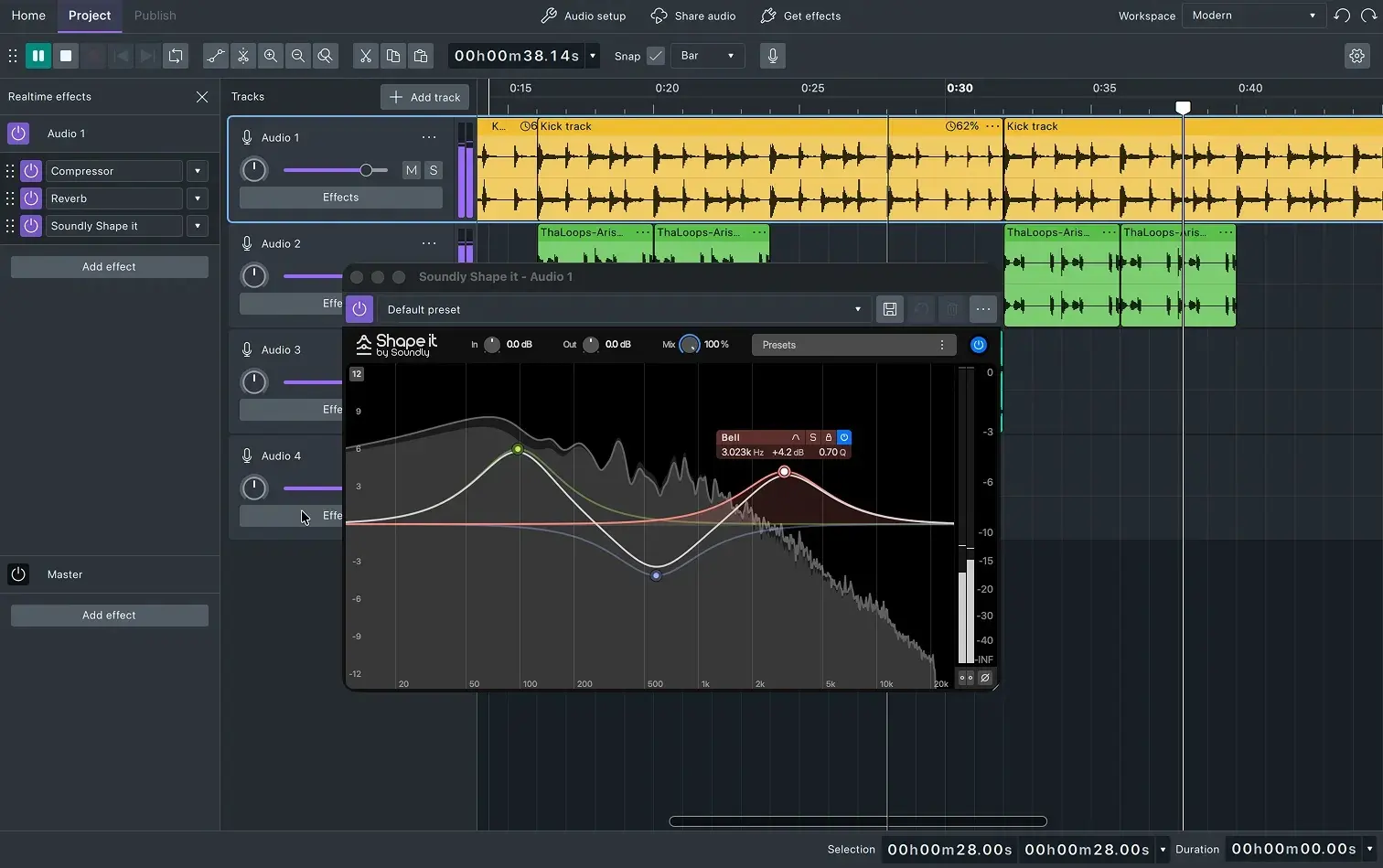
The most immediate change is the redesigned interface, which prioritizes clarity and visual feedback. The introduction of customizable workspaces allows users to tailor the environment to their specific needs, whether they are focused on multi-track mixing or single-track voiceover cleanup. This modular approach ensures that the interface remains uncluttered, showing only the tools necessary for the task at hand. Furthermore, the update introduces high-resolution per-track metering, a feature that provides real-time visual feedback on signal levels, essential for preventing digital clipping and ensuring professional-grade loudness standards.
The Evolution of the Audacity Workflow
The core editing experience in Audacity 4 has been reimagined to align with modern industry standards. Previously, moving and manipulating audio segments required frequent tool switching, which could interrupt the creative flow. The new version introduces "clip handles," which allow for the direct manipulation of audio segments. This enables users to move, trim, and fade clips without needing to select specific tools from the toolbar.
In addition to clip handles, Audacity 4 brings direct sample editing to the forefront. This high-level precision allows users to zoom in to the individual sample level and redraw waveforms to remove clicks, pops, or other artifacts. This level of granular control was once the domain of high-end forensic audio software but is now integrated into the standard Audacity workflow.
Furthermore, the introduction of dedicated loop controls and a more robust markers and regions system enhances the software’s utility for music production and long-form storytelling. Markers can now be locked to specific timestamps or clips, ensuring that edits to the timeline do not inadvertently misalign sync points—a common frustration in previous versions.
Technical Infrastructure and Plug-in Support
Under the hood, Audacity 4 has undergone a massive technological shift. The software now features native support for VST3, LV2, and Audio Units (AU) plug-ins. While earlier versions of Audacity offered varying levels of support for these formats, the implementation in version 4 is significantly more stable and integrated. The redesigned effect windows provide a more intuitive way to manage parameters, allowing for real-time adjustments and previewing.
The transition to a more modern codebase also means better performance on modern hardware. On macOS, the software is fully optimized for Apple Silicon, while Windows and Linux users will benefit from improved resource management and faster rendering times. Despite these massive changes, the development team has ensured backward compatibility. Existing Audacity 3 projects, stored in the .aup3 format, can be opened directly in Audacity 4, ensuring a seamless transition for users currently in the middle of complex projects.
Integration with the Muse Group Ecosystem
The development of Audacity 4 has been heavily influenced by its partnership with Muse Group, the organization that also oversees MuseScore and Ultimate Guitar. This relationship is evident in the integration of Audacity 4 with MuseHub and audio.com. MuseHub serves as a centralized repository for high-quality sound libraries, loops, and effects, many of which are now directly accessible within the Audacity environment.
The integration with audio.com provides a streamlined cloud-based solution for sharing and collaborating. Users can upload their projects directly to the platform for hosting or private sharing with clients and collaborators. While some purists in the open-source community initially expressed concerns about cloud integration, the development team has maintained that these features remain optional, preserving the "offline-first" philosophy that has defined Audacity since its inception.
Chronology of Development: From Version 1.0 to 4.0
To understand the magnitude of the Audacity 4 release, one must look at the software’s timeline. Founded in 1999 by Dominic Mazzoni and Roger Dannenberg at Carnegie Mellon University, Audacity 1.0 was released in 2000. For the next decade, the software evolved slowly, focusing on stability and basic editing features.
The release of Audacity 2.0 in 2012 marked the first major jump, bringing a more stable codebase and improved effects. However, it was the 2021 acquisition of the Audacity brand by Muse Group that accelerated the development cycle. This led to Audacity 3.0, which replaced the cumbersome multi-file project structure with a single SQLite-based .aup3 file. Audacity 4 is the culmination of three years of intensive work following that acquisition, representing the first time the software has been completely rebuilt to meet the demands of the 2020s.
Industry Impact and Competitive Landscape
The release of Audacity 4 arrives at a pivotal moment for the audio industry. The rise of independent podcasting and home-based content creation has increased the demand for accessible yet powerful tools. By offering a professional-grade interface and non-destructive editing for free, Audacity 4 positions itself as a formidable competitor to entry-level paid DAWs such as Reaper, FL Studio, and PreSonus Studio One.
Educational institutions, in particular, are expected to benefit from this update. Because Audacity is free and cross-platform, it is the standard teaching tool in many journalism and music production programs. The modernized interface of version 4 means that students will now be learning on a platform that more closely resembles the high-end software they will encounter in professional environments, such as Avid Pro Tools or Adobe Audition.
Official Responses and Community Feedback
While official statements from the Audacity Team emphasize the "reimagining of the user experience," the broader open-source community has reacted with a mixture of excitement and scrutiny. Early testers have praised the "fluidity" of the new clip-based workflow, noting that it reduces the time required for basic assembly by nearly 40%.
"Our goal with Audacity 4 was not just to add features, but to rethink how users interact with sound," a spokesperson for the development team noted during a recent developer briefing. "We wanted to remove the friction that existed in the old interface while ensuring that the power and flexibility of the engine remained intact."
On community forums and GitHub, developers have noted that the move to more modern UI libraries will make it easier for third-party contributors to create themes and extensions, potentially leading to a new era of community-driven customization for the editor.
Broader Implications for Open-Source Media Tools
Audacity 4 is part of a larger trend in the open-source world where "community-driven" no longer implies "amateur-looking." Alongside tools like Blender for 3D modeling and GIMP or Krita for digital imaging, Audacity is proving that open-source software can maintain professional standards of UX and UI design.
The implications of this release extend beyond just audio editing. It signals a commitment to the longevity of open-source creative tools. By rebuilding the application for modern operating systems and hardware, the Audacity team ensures that the software will remain viable for the next decade of creators. This stability is crucial for users in developing regions and non-profit sectors who rely on free tools to give voice to their communities.
Availability and Future Outlook
Audacity 4 is available immediately as a free download from the official Audacity website. It supports Windows 10 and 11, macOS (Intel and Silicon), and various Linux distributions via AppImage or Flatpak.
Looking forward, the development roadmap suggests that the team will continue to refine the non-destructive editing engine, with potential plans for real-time effect processing (where effects can be changed or removed at any time without altering the original audio file). This would bring Audacity into full parity with professional DAWs. For now, Audacity 4 stands as a landmark achievement in open-source development, offering a powerful, accessible, and modern platform for anyone with a story to tell or a song to record.
