
Technical Architecture and the Chopper Engine
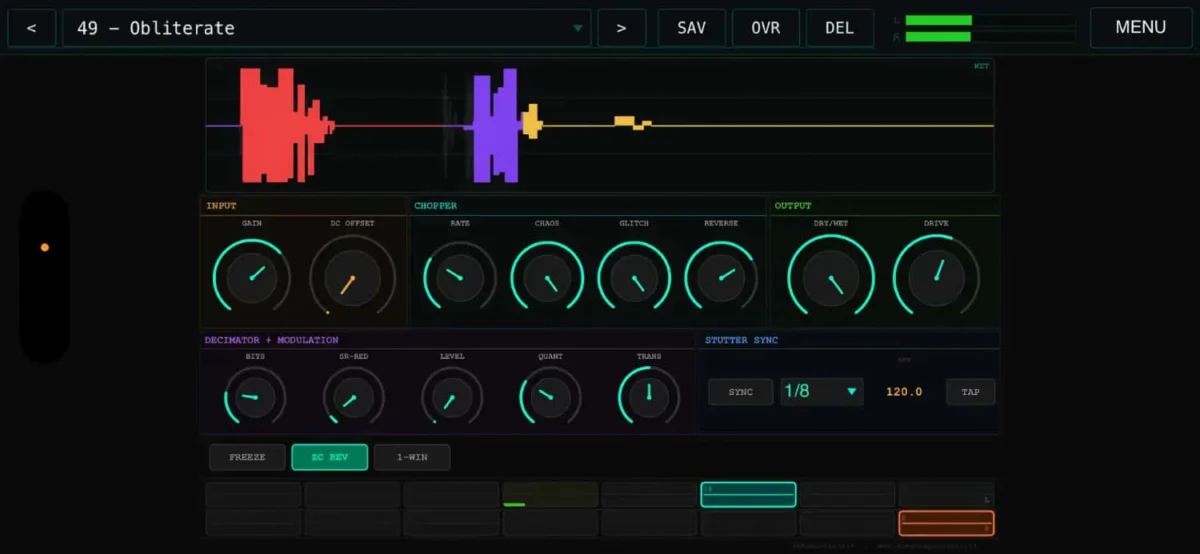
At the core of GlitchShredder’s functionality is its proprietary "Chopper" engine, which provides a granular level of control over the audio buffer. Unlike traditional delay or looper effects that treat audio as a continuous stream, GlitchShredder segments incoming signals into discrete blocks. The engine features independent processing for left and right channels, a design choice that allows for the creation of wide, complex stereo soundscapes. Each channel is equipped with 16 individual segment slots, which act as temporary storage for captured audio fragments. This 16-slot architecture enables the software to juggle multiple rhythmic and melodic ideas simultaneously, allowing users to "shred" a coherent input signal into a mosaic of rhythmic pulses and micro-loops.
The processing power required for real-time audio manipulation on mobile devices has historically been a bottleneck for developers. However, GlitchShredder utilizes the latest optimizations in iPadOS and iOS to maintain low-latency performance. The application’s ability to manipulate these segments—through reversal, repetition, and recombination—occurs instantaneously, making it a viable tool for live performance as well as studio production. The independent nature of the left and right channel processing means that a user could, for example, apply a high-frequency stutter to the left channel while maintaining a reversed, half-speed loop on the right, creating a sense of depth and movement that is difficult to achieve with standard effects.
Probabilistic Manipulation and Generative Features
One of the most distinguishing characteristics of GlitchShredder is its implementation of probabilistic controls. In modern electronic music production, "glitch" is often defined by its unpredictability. To facilitate this, the developers have included specific "Glitch Probability" and "Reverse Probability" parameters. These allow the user to set the likelihood that a particular segment will be manipulated or reversed at any given moment. By moving away from static, predictable patterns, GlitchShredder moves into the realm of generative art, where the software makes micro-decisions based on the user’s defined constraints.
This probabilistic approach is further enhanced by quantized jumps and transient detection. Transient detection is a critical feature for rhythmic precision; it allows the software to identify the "hits" or peaks in an audio signal—such as the crack of a snare drum or the pluck of a guitar string—and use those points as triggers for segmentation. This ensures that the resulting glitches remain musically relevant and rhythmically coherent, even when the audio is being heavily processed. The inclusion of quantized jumps means that when the software moves between different segments in the 16-slot buffer, it does so in time with the musical grid, preventing the "drift" that can occur with less sophisticated looping tools.
Synchronization and Host Integration
For professional music production, timing is paramount. GlitchShredder offers a versatile suite of synchronization options under its "Stutter Sync" module. When used as an AUv3 plugin, the software can automatically follow the host’s tempo, ensuring that all stutters and repetitions are perfectly aligned with the project’s BPM. This is essential for genres like IDM (Intelligent Dance Music), glitch-hop, and techno, where rhythmic precision is a defining element of the sound.
In scenarios where host synchronization is not desired or available—such as when using the app in standalone mode for experimental sound design—GlitchShredder provides a manual BPM input and a Tap Tempo function. This flexibility allows the user to treat the app as a standalone instrument, processing external audio sources through an iPad-connected audio interface. The integration with AUv3 hosts like Logic Pro for iPad and AUM is particularly noteworthy, as it allows for multiple instances of the effect to be used across different tracks, each with its own unique settings and automation parameters.
The Evolution of Mobile Music Production Context
The release of GlitchShredder occurs at a pivotal moment in the history of mobile music production. Over the last decade, the iPad has transitioned from a consumption device to a legitimate creative workstation. The introduction of the AUv3 (Audio Unit version 3) standard by Apple was the catalyst for this shift, as it allowed third-party developers to create plugins that could "talk" to each other within a single host environment, mimicking the workflow of desktop Digital Audio Workstations (DAWs) like Ableton Live or Pro Tools.
The market for iOS music apps has seen a surge in "boutique" effects that focus on niche sound design techniques. GlitchShredder fits into a lineage of tools that prioritize the "aesthetic of failure"—the intentional use of digital artifacts and errors as a creative choice. This movement, which gained mainstream traction in the late 1990s and early 2000s through artists like Autechre and Oval, has seen a resurgence as modern producers look for ways to break away from the "clean" sound of digital synthesis. GlitchShredder provides these producers with a portable, affordable, and highly tactile way to achieve these complex textures.
Comparative Market Analysis and Pricing
At a retail price of $4.99 USD, GlitchShredder is positioned aggressively within the App Store’s music category. This price point reflects a broader trend in the mobile software industry where high-utility professional tools are offered at a fraction of the cost of their desktop counterparts. For comparison, similar glitch-style plugins for Windows or macOS can cost anywhere from $49 to $149. By offering a comparable feature set for under five dollars, the developers are tapping into the "prosumer" market—musicians who demand professional features but operate on a mobile-first budget.
Despite its low price, the software does not compromise on the depth of its feature set. The inclusion of 16 slots per channel and advanced transient detection places it in direct competition with established iOS effects. The lack of an "introductory" or "subscription" pricing model has also been noted favorably by the user community, as it follows the traditional "pay-once-own-forever" model that is increasingly rare in the modern software landscape.
Implications for Live Performance and Sound Design
The portability of the iPhone and iPad makes GlitchShredder an particularly attractive tool for live performers. In a live setting, a musician can route their hardware synthesizers or vocals through an iPad running GlitchShredder to add improvisational textures. The touch interface allows for a level of physical interaction—such as "throwing" sliders or tapping out rhythms—that is more engaging for an audience than a performer looking at a laptop screen.
Furthermore, the implications for sound design extend beyond music. Sound designers for film and video games often require "glitched" textures to represent technology, sci-fi environments, or psychological tension. The ability to quickly capture a field recording and "shred" it into hundreds of variations makes GlitchShredder a valuable asset in the foley and post-production toolkit. The real-time nature of the processing means that designers can "perform" their sound effects, capturing the output as they manipulate the parameters to find the perfect sonic accident.
Conclusion and Future Outlook
The launch of GlitchShredder signifies the continued maturation of the iOS audio ecosystem. By providing a specialized tool that focuses on the intricate manipulation of audio buffers, the developers have contributed to the democratization of advanced sound design. As mobile hardware continues to evolve—with the M-series chips in the iPad Pro now rivaling desktop processors—the ceiling for what is possible in real-time mobile audio effects continues to rise.
GlitchShredder stands as a testament to the power of focused software design. It does not attempt to be an all-in-one workstation; instead, it masters a specific niche of audio processing. For the modern producer, it offers a blend of rhythmic precision and controlled chaos, all housed within an interface that encourages experimentation. As more artists move toward "DAWless" or mobile-centric setups, tools like GlitchShredder will likely become staples of the contemporary digital studio, proving that professional-grade audio manipulation is no longer tethered to the desktop.
